AtlasPhysics
An educational web platform designed to help high school students explore physics through interactive simulations, virtual laboratories, and real-time experimentation.
    
📖 Table of Contents
- Overview
- Educational Philosophy
- Educational Objectives
- Features
- Physics Laboratory
- Electricity Laboratory
- Technology Stack
- Project Architecture
- Screenshots
- Installation
- Project Structure
- Development Challenges
- Lessons Learned
- Roadmap
- Contributing
- License
- Acknowledgements
- Author
🌍 Overview
AtlasPhysics is a browser-based educational platform that transforms traditional physics learning into an interactive experience.
Instead of studying formulas in isolation, students can manipulate variables, perform virtual experiments, build electrical circuits, and immediately observe how physical systems respond.
The project was independently designed and developed as a personal learning experience while exploring modern web development, interactive graphics, and educational software.
Although AtlasPhysics currently focuses on concepts commonly taught in high school physics, its modular architecture allows additional laboratories and simulations to be integrated in the future.
The platform combines visual learning, experimentation, and real-time feedback to encourage deeper conceptual understanding rather than memorization.
💡 Why AtlasPhysics?
Many students encounter physics as a collection of equations to memorize. While formulas are essential, they often become meaningful only after students have observed the physical phenomena they describe.
AtlasPhysics was created to bridge that gap by allowing learners to explore physics through direct interaction.
Instead of asking:
“Which formula should I use?”
students are encouraged to ask:
- Why does this happen?
- What changes if I modify this value?
- What happens if I remove this component?
- Can I predict the result before running the simulation?
The goal is to transform learning from passive observation into active exploration.
🎓 Educational Philosophy
AtlasPhysics is built around a simple learning cycle.
Predict
   ↓
Experiment
   ↓
Observe
   ↓
Measure
   ↓
Analyze
   ↓
Understand
Rather than presenting equations first, each laboratory encourages students to investigate physical systems, collect observations, and build intuition before introducing mathematical relationships.
This mirrors the way science is practiced: through curiosity, experimentation, and evidence.
Interactive simulations allow students to connect theoretical concepts with visual and measurable outcomes, making abstract ideas easier to understand and remember.
🎯 Educational Objectives
AtlasPhysics was designed with several educational goals in mind.
| Objective | Description |
|---|---|
| 🧪 Interactive Learning | Encourage students to explore concepts through experimentation rather than memorization. |
| 📊 Visualization | Transform abstract physics concepts into dynamic visual experiences. |
| ⚡ Real-Time Feedback | Update simulations instantly as parameters change. |
| 🔍 Scientific Thinking | Promote prediction, observation, measurement, and analysis. |
| 📚 Conceptual Understanding | Help students develop intuition before applying mathematical formulas. |
| 🎮 Engagement | Make learning physics more interactive and enjoyable. |
📊 Project Statistics
| Category | Current Status | |———–|—————-| | 🧪 Physics Simulations | 11 Interactive Simulations | | ⚡ Electrical Components | 6+ Interactive Components | | 🧩 Laboratories | Physics Laboratory & Electricity Laboratory | | 🎯 Educational Systems | Missions, Tutorials, Sandbox Learning | | 📈 Analysis Tools | Real-Time Graphs & Electrical Analysis | | 💻 Technologies | HTML5 • CSS3 • JavaScript • SVG • Canvas • Matter.js | | 📦 Status | Active Development | —
✨ Features
AtlasPhysics combines multiple educational tools into a single interactive learning platform.
| Feature | Description | |———|————-| | 🧪 Interactive Physics Laboratory | Explore mechanics through real-time simulations and experimentation. | | ⚡ Electricity Sandbox | Build, edit, and analyze electrical circuits visually. | | 🔌 Drag-and-Drop Circuit Builder | Assemble circuits using interactive electrical components. | | 📊 Live Electrical Analysis | Instantly calculate voltage, current, resistance, power, and circuit topology. | | 📈 Interactive Graphs | Dynamic graphs update continuously during simulations. | | 🎯 Mission System | Guided educational activities that encourage exploration and problem solving. | | 🎓 Interactive Tutorials | Step-by-step tutorials introducing laboratory tools and concepts. | | 🔄 Undo & Redo | Easily revert or restore circuit modifications. | | 🔍 Zoom & Pan Workspace | Navigate large electrical circuits smoothly. | | 📐 Grid Snapping | Components align precisely for cleaner circuit construction. | | 🔥 Realistic Simulation Mode | Simulate component failures and overload conditions. | | 🔊 Sound Effects | Optional interactive audio feedback. | | 📱 Responsive Interface | Optimized for desktop and tablet devices. | | 🎨 Modern Educational UI | Notebook-inspired interface designed for classroom learning. | —
🧠 Learning Approach
Every AtlasPhysics simulation encourages students to:
- Predict the outcome.
- Perform an experiment.
- Observe the results.
- Measure physical quantities.
- Analyze the data.
- Connect observations with theory.
The objective is to develop conceptual understanding through experimentation rather than memorization.
🧪 Physics Laboratory
The Physics Laboratory is the core educational module of AtlasPhysics. It provides interactive simulations designed to help students visualize, experiment with, and better understand the fundamental principles of physics.
Instead of relying solely on textbook examples, students can manipulate variables, observe real-time changes, and discover how physical laws govern motion and energy.
Each simulation emphasizes exploration, allowing learners to test hypotheses, analyze outcomes, and develop intuition before applying mathematical formulas.
🔬 Available Simulations
| Laboratory | Description |
|---|---|
| 🚗 Kinematics | Investigate displacement, velocity, acceleration, and time through interactive motion simulations and dynamic graphs. |
| ⚖️ Newton’s Laws | Explore the relationship between force and motion while visualizing Newton’s First, Second, and Third Laws. |
| 🧲 Forces | Analyze balanced and unbalanced forces, vector addition, and their effects on an object’s motion. |
| ⚡ Energy | Observe the transformation between kinetic and potential energy while reinforcing the principle of energy conservation. |
| 🛷 Inclined Plane | Experiment with different slope angles and investigate how gravity affects acceleration along an inclined surface. |
| 🌀 Springs | Explore Hooke’s Law by adjusting spring stiffness and displacement while observing elastic behavior. |
| 🕰️ Pendulum | Investigate oscillatory motion by modifying pendulum length, gravity, and release angle. |
| 🚀 Projectile Motion | Launch projectiles using customizable velocities and launch angles while analyzing trajectories, range, and maximum height. |
| 🍎 Free Fall | Examine gravitational acceleration and compare different initial conditions in a controlled environment. |
| ➡️ Vector Operations | Visualize vector addition, subtraction, magnitude, direction, and resultant vectors interactively. |
| 📈 Interactive Graphs | Generate real-time graphs that update dynamically as simulation parameters change. |
🎮 Interactive Learning Experience
Each laboratory allows students to:
- Modify physical parameters using intuitive controls.
- Observe immediate visual feedback.
- Compare multiple scenarios.
- Interpret dynamic graphs.
- Build intuition through experimentation.
- Reinforce classroom concepts with interactive visualization.
The focus is on understanding why physical phenomena occur, not simply obtaining numerical results.
📊 Real-Time Visualization
AtlasPhysics continuously updates simulations as users interact with them.
Examples include:
- Object motion
- Velocity vectors
- Force vectors
- Energy transformations
- Projectile trajectories
- Oscillatory motion
- Graph updates
- Numerical measurements
This immediate feedback helps students connect theoretical concepts with observable behavior.
⚡ Electricity Laboratory
The Electricity Laboratory is an interactive sandbox where students can design, modify, and analyze electrical circuits in real time.
Rather than drawing static circuit diagrams, learners build complete electrical systems using draggable components while immediately observing how voltage, current, resistance, and power respond to their modifications.
The laboratory emphasizes experimentation, allowing students to safely test ideas, make mistakes, and develop intuition through interactive learning.
🔌 Circuit Builder
The circuit editor includes:
- Drag-and-drop electrical components
- Interactive wire creation
- Automatic terminal snapping
- Component rotation
- Context menus
- Undo / Redo history
- Zoom and pan navigation
- Grid snapping
- Multi-component selection
- Circuit validation
- Real-time editing
- Interactive workspace
⚙️ Available Components
| Component | Description |
|---|---|
| 🔋 DC Generator | Electrical power source |
| 💡 Lamp | Visualizes current flow and electrical power |
| 🟫 Resistor | Demonstrates resistance and voltage drop |
| 🎚️ Switch | Opens and closes circuits |
| 📏 Ammeter | Measures electrical current |
| 📐 Voltmeter | Measures voltage |
📊 Live Electrical Analysis
AtlasPhysics continuously evaluates every circuit and displays:
- Generator Voltage
- Total Current
- Equivalent Resistance
- Electrical Power
- Energy Consumption
- Efficiency
- Branch Count
- Circuit Topology
- Branch Currents
- Voltage Distribution
Calculations update instantly whenever the circuit changes, helping students connect theory with practical experimentation.
🎓 Learning Features
The Electricity Laboratory also includes:
- Guided tutorials
- Interactive missions
- Real-time educational hints
- Visual current flow
- Circuit validation messages
- Realistic overload simulation
- Educational analysis panel
- Interactive feedback system
These features encourage exploration while reinforcing core concepts such as Ohm’s Law, Kirchhoff’s Laws, equivalent resistance, electrical power, and circuit analysis.
💻 Technology Stack
AtlasPhysics is intentionally built using core web technologies to strengthen understanding of browser-based application development without relying on heavy external frameworks.
| Technology | Purpose |
|---|---|
| HTML5 | Application structure and semantic layout |
| CSS3 | Styling, responsive layouts, animations, and visual design |
| JavaScript (ES6+) | Interactive logic, simulations, calculations, and user interactions |
| Matter.js | Physics engine powering mechanics simulations |
| SVG | Circuit rendering, diagrams, scalable graphics, and vector illustrations |
| HTML5 Canvas | Real-time physics rendering, animations, and interactive visualizations |
AtlasPhysics is primarily built using native web technologies (HTML, CSS, and JavaScript) together with Matter.js for physics simulation. SVG and HTML5 Canvas are used for rendering interactive visualizations and educational interfaces, while the application logic and educational features are implemented with modern JavaScript and browser APIs.
🏗️ Project Architecture
AtlasPhysics follows a progressively modular architecture.
The application is currently organized into separate HTML, CSS, and JavaScript files. Internally, the JavaScript is structured into logical subsystems (physics simulation, electricity laboratory, rendering, tutorials, missions, and user interface) and is being gradually refactored into dedicated modules to improve maintainability and scalability.
graph TD

A[AtlasPhysics]

A --> B[Home]

A --> C[Lessons]

A --> D[Physics Laboratory]

A --> E[Electricity Laboratory]

D --> F[Physics Simulations]

D --> G[Interactive Graphs]

D --> H[Visualization Engine]

E --> I[Circuit Builder]

E --> J[Electrical Analysis]

E --> K[Component System]

E --> L[Wire System]

A --> M[Shared User Interface]

A --> N[Assets]

A --> O[Educational Content]
The modular organization simplifies future expansion while keeping each subsystem independent and maintainable.
📸 Screenshots
Explore AtlasPhysics through its interactive laboratories, scientific visualizations, and educational tools.
🏠 Homepage
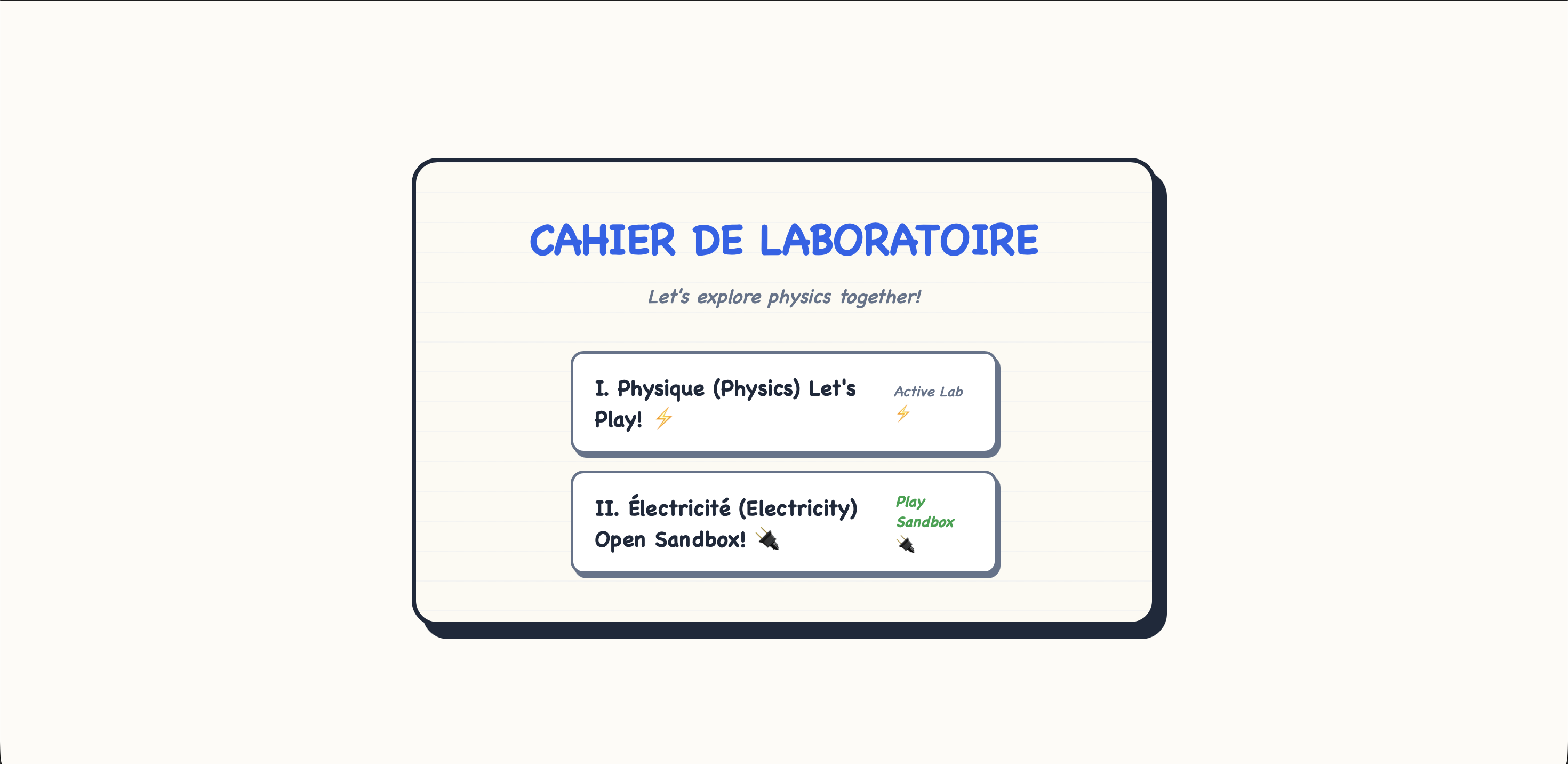
The notebook-inspired homepage provides an intuitive entry point to the platform, allowing students to quickly access the Physics Laboratory and the Electricity Laboratory through a clean and engaging interface.
🧪 Physics Laboratory
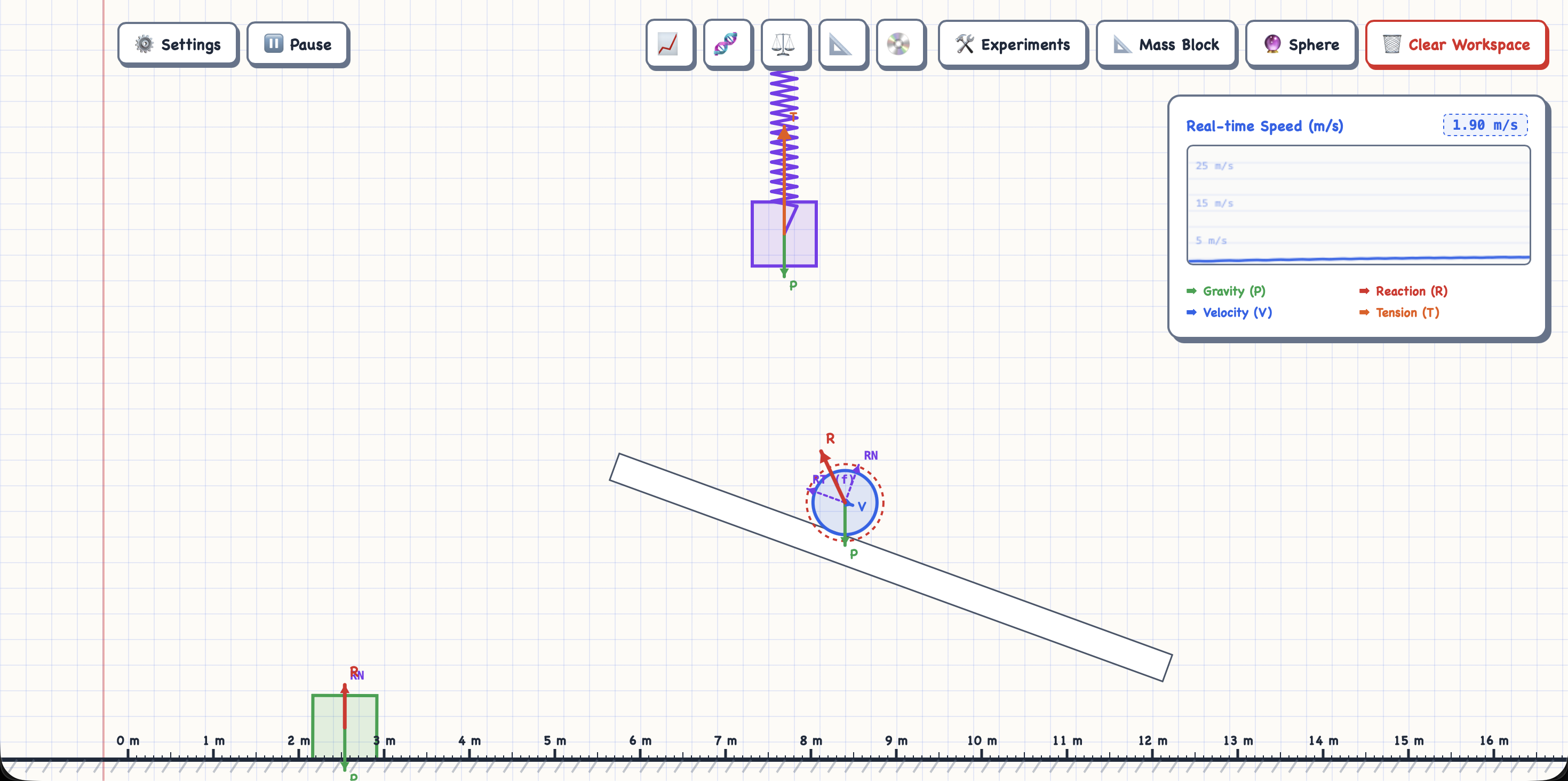
The Physics Laboratory enables students to explore mechanics through interactive simulations, manipulate physical parameters, visualize vectors, and observe real-time scientific graphs while experimenting.
⚡ Electricity Laboratory
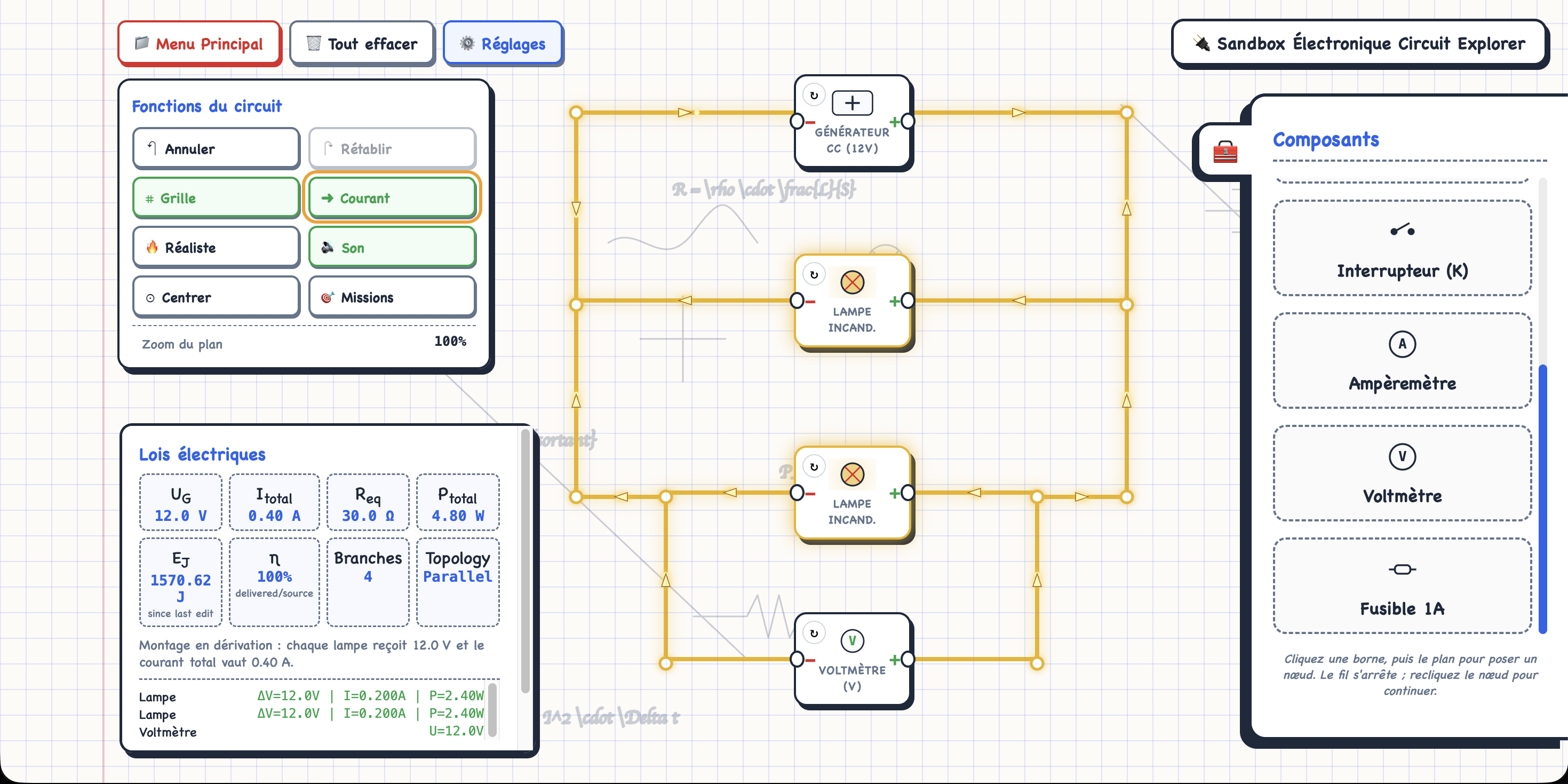
Students can build electrical circuits using drag-and-drop components, connect wires interactively, and immediately observe how electrical quantities change as the circuit evolves.
📈 Interactive Graphs
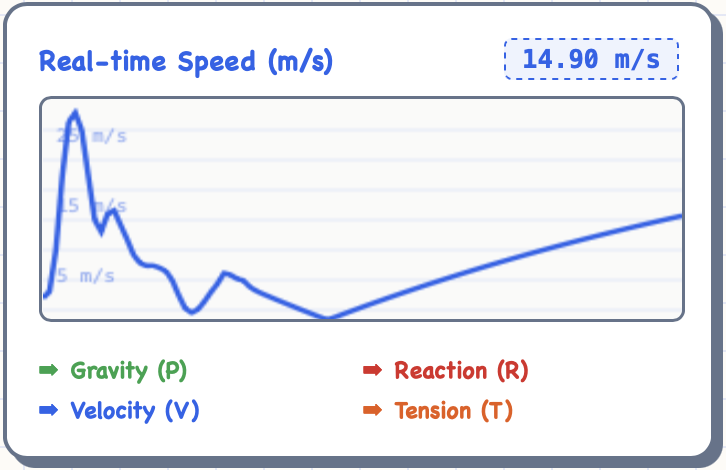
Dynamic scientific graphs update continuously during experiments, helping learners connect theoretical concepts with measurable physical behavior through real-time visualization.
📊 Analysis Panel
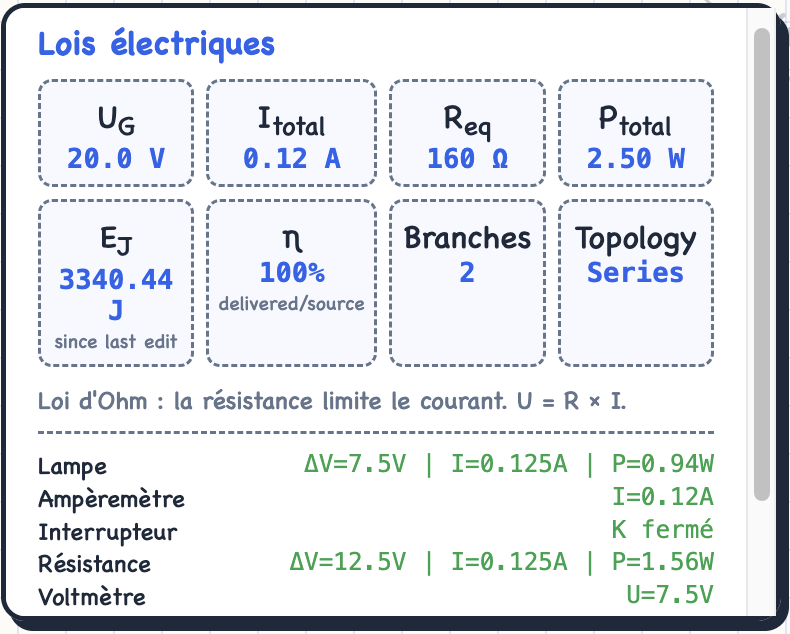
The analysis panel automatically computes voltage, current, equivalent resistance, electrical power, energy consumption, efficiency, and other circuit properties, providing instant educational feedback.
🎥 Circuit Builder Demonstration
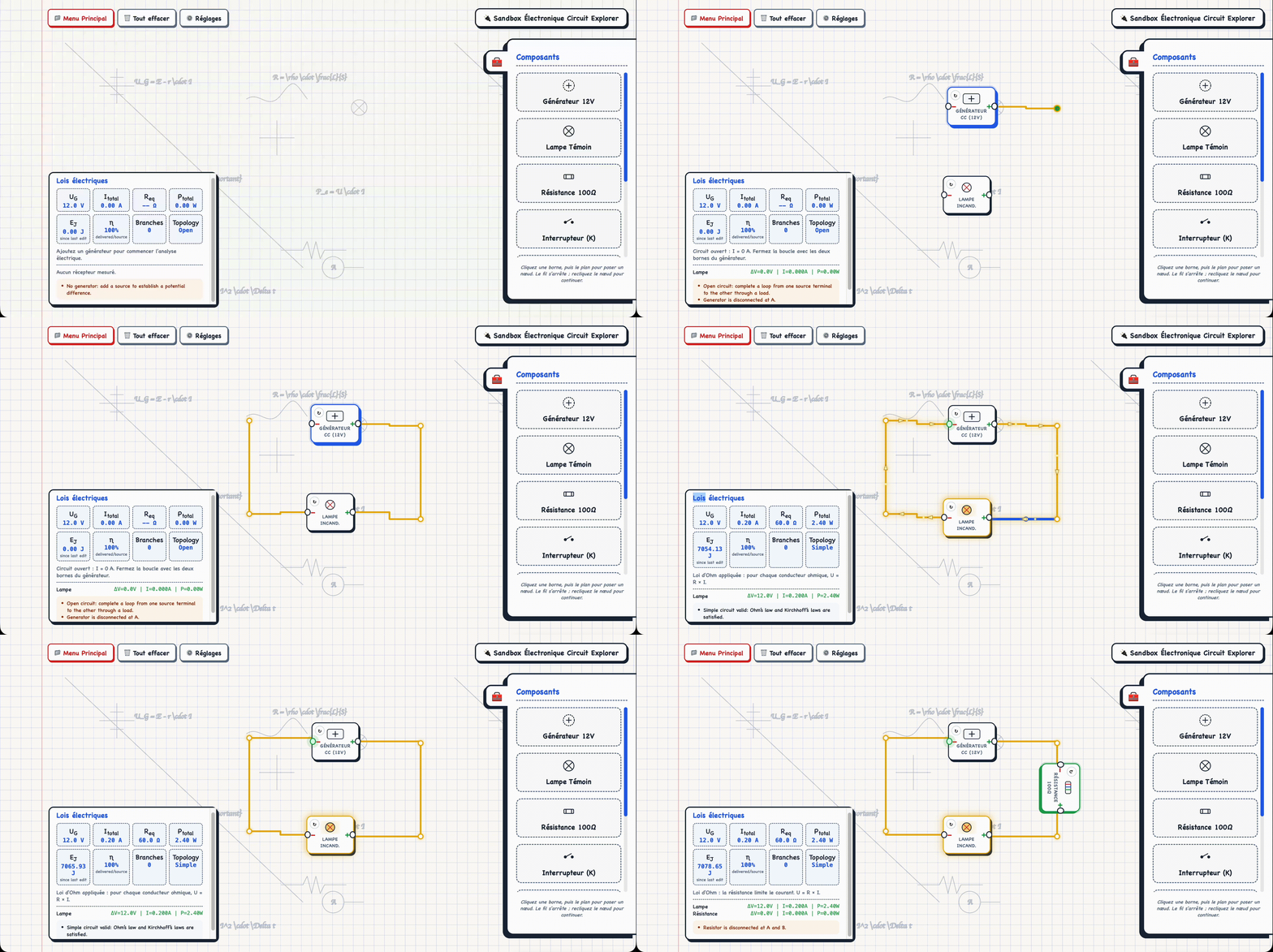
This demonstration showcases the complete circuit-building workflow, from placing electrical components and connecting wires to running the simulation and observing live electrical analysis.
🚀 Installation
AtlasPhysics is a browser-based web application built with standard web technologies and does not require any external dependencies or build tools.
Prerequisites
Before running the project, make sure you have:
- A modern web browser (Chrome, Firefox, Edge, or Safari)
- Git (optional, for cloning the repository)
- Visual Studio Code (recommended)
- Live Server extension for Visual Studio Code (recommended)
Clone the Repository
git clone https://github.com/Saadbarch/AtlasPhysics.git
Navigate to the project directory:
cd AtlasPhysics
code .
▶️ Run the Project
AtlasPhysics is a browser-based application and requires no build tools or package installation.
Choose one of the following options:
Option 1 — Visual Studio Code (Recommended)
- Open the project in Visual Studio Code.
- Install the Live Server extension.
- Right-click
index.html. - Select Open with Live Server.
Option 2 — Directly in Your Browser
Simply open the index.html file in any modern web browser.
📂 Project Structure
The project is organized into separate files for structure, styling, and application logic.
AtlasPhysics/
│
├── index.html              # Main application entry point
├── README.md
├── LICENSE
│
├── css/
│   └── style.css           # Global styles
│
├── js/
│   └── main.js             # Application logic
│
└── docs/
    └── images/
The application currently consists of:
- index.html — User interface and application layout
- style.css — Visual design, responsive layout, and animations
- main.js — Physics engine, electricity laboratory, simulations, rendering, and application logic
The JavaScript code is currently maintained in a single file while being progressively refactored into dedicated modules.
⚙️ Development Challenges
Building AtlasPhysics involved solving several technical and educational challenges.
Designing Interactive Simulations
Creating simulations that are both visually engaging and educational required balancing realism with simplicity.
Every simulation needed to provide immediate feedback while remaining intuitive for high school students.
Building the Electricity Sandbox
The circuit editor became one of the most technically demanding parts of the project.
Challenges included:
- Managing interactive wire connections
- Keeping wires synchronized while moving components
- Validating circuit connections
- Updating calculations in real time
- Maintaining clean user interactions
Designing an editor that feels intuitive while accurately representing electrical behavior required many iterations and refinements.
Organizing the Codebase
As AtlasPhysics expanded, maintaining a clean architecture became increasingly important.
The project gradually evolved into independent modules responsible for:
- Simulations
- User Interface
- Rendering
- Educational Content
- Circuit Management
- Utility Functions
This organization makes future development more manageable.
Educational Design
Developing educational software involves more than writing code.
Every feature was designed to answer questions such as:
- Does this improve understanding?
- Is the interaction intuitive?
- Can students experiment freely?
- Does the visualization explain the concept?
These considerations shaped many design decisions throughout development.
📚 Lessons Learned
AtlasPhysics has been one of the most valuable learning experiences of my high school years. Throughout its development, I deepened my understanding of educational software design, iterative product development, interactive simulations, debugging, project organization, and the process of transforming an idea into a working educational platform.
🗺️ Roadmap
Version 1.x
- Add additional mechanics simulations
- Improve mobile responsiveness
- Save and load experiments
- Publish a live demo
Version 2.x
- Chemistry Laboratory
- Waves & Sound Laboratory
- Optics Laboratory
- Thermodynamics Laboratory
- Interactive quizzes
- Experiment report export (PDF)
Long-Term Vision
- Teacher dashboard
- Classroom mode
- Student progress tracking
- Multi-language support
🤝 Contributing
AtlasPhysics is currently a personal project developed for learning and experimentation.
If you discover a bug, have a suggestion, or would like to discuss an idea, feel free to open an issue.
How to Contribute
- Fork the repository.
- Create a new feature branch.
git checkout -b feature/my-feature
- Commit your changes.
git commit -m "Add amazing feature"
- Push to your branch.
git push origin feature/my-feature
- Open a Pull Request describing your changes.
Please ensure that new features remain consistent with the project’s educational goals and coding style.
📜 License
This project is licensed under the MIT License.
You are free to:
- Use
- Modify
- Distribute
- Study
- Adapt
the source code in accordance with the terms of the MIT License.
See the LICENSE file for more information.
🙏 Acknowledgements
Special thanks to:
- The open-source community for providing the tools and libraries that made this project possible.
- Physics educators whose teaching inspired many of the simulations included in AtlasPhysics.
🌟 Why This Project Matters
Physics is often introduced through equations before students have an opportunity to develop an intuitive understanding of the concepts those equations describe.
AtlasPhysics takes a different approach.
Rather than asking students to memorize formulas first, it encourages them to:
- Explore
- Experiment
- Observe
- Measure
- Analyze
- Understand
The platform is designed to make learning an active process where students discover relationships through interaction rather than passive observation.
Whether constructing electrical circuits, investigating projectile motion, or exploring Newton’s Laws, the emphasis is always on developing conceptual understanding through experimentation.
📈 Project Highlights
- ⚛️ Interactive physics simulations
- ⚡ Visual circuit builder
- 📊 Real-time graphs and analysis
- 🎮 Hands-on experimentation
- 🎓 Educational-first design
- 💻 Built with HTML, CSS, JavaScript, Matter.js, SVG, and Canvas
- 🧩 Modular architecture for future expansion
- 🌐 Runs entirely in the browser
- 📚 Designed for high school physics education
- 🚀 Continuously evolving
👨💻 Author
Saad Barch
High School Student • Aspiring Software Engineer • Physics Enthusiast
AtlasPhysics was independently designed and developed as a personal project combining software engineering, physics education, and interactive simulation.
The project reflects a passion for creating educational tools that make scientific concepts more engaging, visual, and accessible.
If you have suggestions, feedback, or collaboration ideas, feel free to open an issue or submit a pull request.